ChatGPT Atlas Deprecated: What the Shutdown Means for AI Search and GEO
Update, July 12, 2026: ChatGPT Atlas is no longer a forward-looking browser strategy to optimize around as a standalone product. Current reporting says OpenAI is discontinuing the Atlas browser on and folding its useful ideas into broader ChatGPT desktop and browser-extension workflows. The SEO lesson is still important: do not optimize around one app launch. Optimize for clean, crawlable, structured, agent-readable pages that can survive product churn.
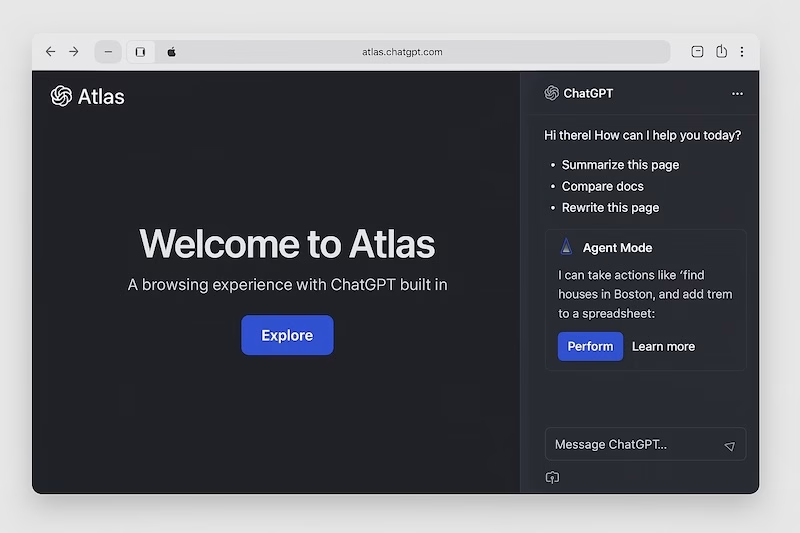
What changed with ChatGPT Atlas?
OpenAI introduced ChatGPT Atlas on October 21, 2025 as a macOS browser with ChatGPT built into the browsing experience. The original launch positioned Atlas around page-aware assistance, browser memories, and an agent mode that could take actions in the browser. OpenAI’s launch post said Atlas shipped worldwide on macOS and that Windows, iOS, and Android experiences were planned.
That context has changed. As of July 2026, current technology reporting says OpenAI is discontinuing the standalone Atlas browser on August 9, 2026 and moving the useful concepts into ChatGPT desktop and browser-adjacent workflows. OpenAI’s public Atlas launch and help-center pages still document the original product and release history, but we did not find an official OpenAI sunset post during this update. Treat the shutdown date as reported, not as a direct OpenAI quote.
The practical takeaway: Atlas was a signal, not the destination. The durable trend is still agentic browsing: AI systems reading pages, extracting facts, comparing choices, and helping users take action.
SEO diagnosis: why this post had a problem
This article previously contained raw page-builder shortcodes from an inactive page builder in the stored WordPress post content. Those shortcodes are not meaningful content for search engines, AI crawlers, or social preview systems. When a builder plugin is inactive, missing, or no longer part of the site architecture, those tokens can leak into the rendered page, excerpts, Open Graph descriptions, and REST API output.
That is especially risky on this site because Lexington Digital is now a WordPress and React hybrid. Some routes are React-prerendered and governed by theme metadata, while legacy WordPress posts are served through WordPress. A page-builder shortcode left in a WordPress post creates a separate class of SEO damage from the React route issues: it makes the page look stale, machine-generated, or broken at the content layer.
For this article, the fix is to remove the builder wrappers entirely and store clean semantic HTML in the post. The page should not depend on an inactive page builder to produce readable content.
What still matters for AI search
The old version of this post over-weighted Atlas as a new surface. The corrected view is broader: AI search optimization should prepare your content for systems that summarize, cite, compare, and act across many interfaces, including ChatGPT, Google AI Mode, Perplexity, Copilot, browser extensions, desktop assistants, and future agent workflows.
- Clean HTML matters. The core answer, facts, links, and calls to action need to exist in the server-rendered page or WordPress-rendered body.
- Specific claims need evidence. AI systems are more likely to reuse facts that are clear, sourced, and easy to attribute.
- Action paths need clarity. If an assistant is helping a user compare vendors, book a call, buy a product, or request a quote, your page needs obvious next steps and structured data.
- Product launches are unstable. Optimizing for “Atlas” alone aged poorly. Optimizing for agent-readable content remains durable.
The corrected GEO action plan
1. Make the first answer explicit
Open each strategic page with a direct answer to the query it should satisfy. For this post, the answer is: ChatGPT Atlas was an important AI-browser signal, but its reported shutdown means brands should optimize for agent-readable web standards rather than one standalone browser.
2. Remove builder residue
Audit WordPress posts and pages for shortcodes from inactive page builders. Replace wrappers with semantic HTML: article, section, h2, ul, figure, and normal links.
3. Keep citations visible
When covering fast-moving AI products, link to primary launch pages, official help-center pages, and current reporting. Separate confirmed official product behavior from reported roadmap or shutdown claims.
4. Align metadata with the actual update
The title, meta description, Open Graph description, Twitter description, canonical URL, and schema should all describe the current article. Do not leave editorial notes, builder shortcodes, or outdated launch claims in SEO metadata.
5. Optimize for agents, not novelty
The page should explain what changed, what it means, and what to do next. AI systems need clear conclusions, not hype about a product that may no longer exist in a few weeks.
Technical checklist
- Remove inactive page-builder shortcodes from stored WordPress content.
- Verify the rendered source does not expose abandoned shortcode text from inactive builders.
- Confirm the canonical URL resolves to the live post URL.
- Update Yoast meta description, Open Graph description, and Twitter description.
- Keep the featured image alt text descriptive and non-promotional.
- Use a current
dateModifiedthrough WordPress/Yoast by updating the post. - Check the XML sitemap after publishing to confirm the updated timestamp appears.
FAQ
Is ChatGPT Atlas deprecated?
Current reporting says OpenAI is discontinuing the standalone ChatGPT Atlas browser on August 9, 2026. We did not find an official OpenAI sunset announcement during this update, so the shutdown date should be treated as reported rather than directly announced in the official Atlas launch or help-center pages.
Does Atlas still matter for SEO?
Atlas matters as a case study. It showed how AI assistants can read, summarize, and act inside browsing workflows. The standalone browser may be going away, but the larger agentic browsing pattern is still relevant.
Why are page-builder shortcodes bad for SEO?
Inactive builder shortcodes are implementation artifacts, not useful page content. If they leak into rendered HTML, excerpts, REST responses, or social metadata, they can make a page look broken or low-quality to search engines, AI systems, and users.
Should an inactive page builder be installed to render old content?
No. On this site, the cleaner fix is to remove legacy builder markup and store semantic HTML. Reinstalling a page builder to support a few old posts would add dependency risk and bloat without solving the underlying content hygiene issue.
Sources